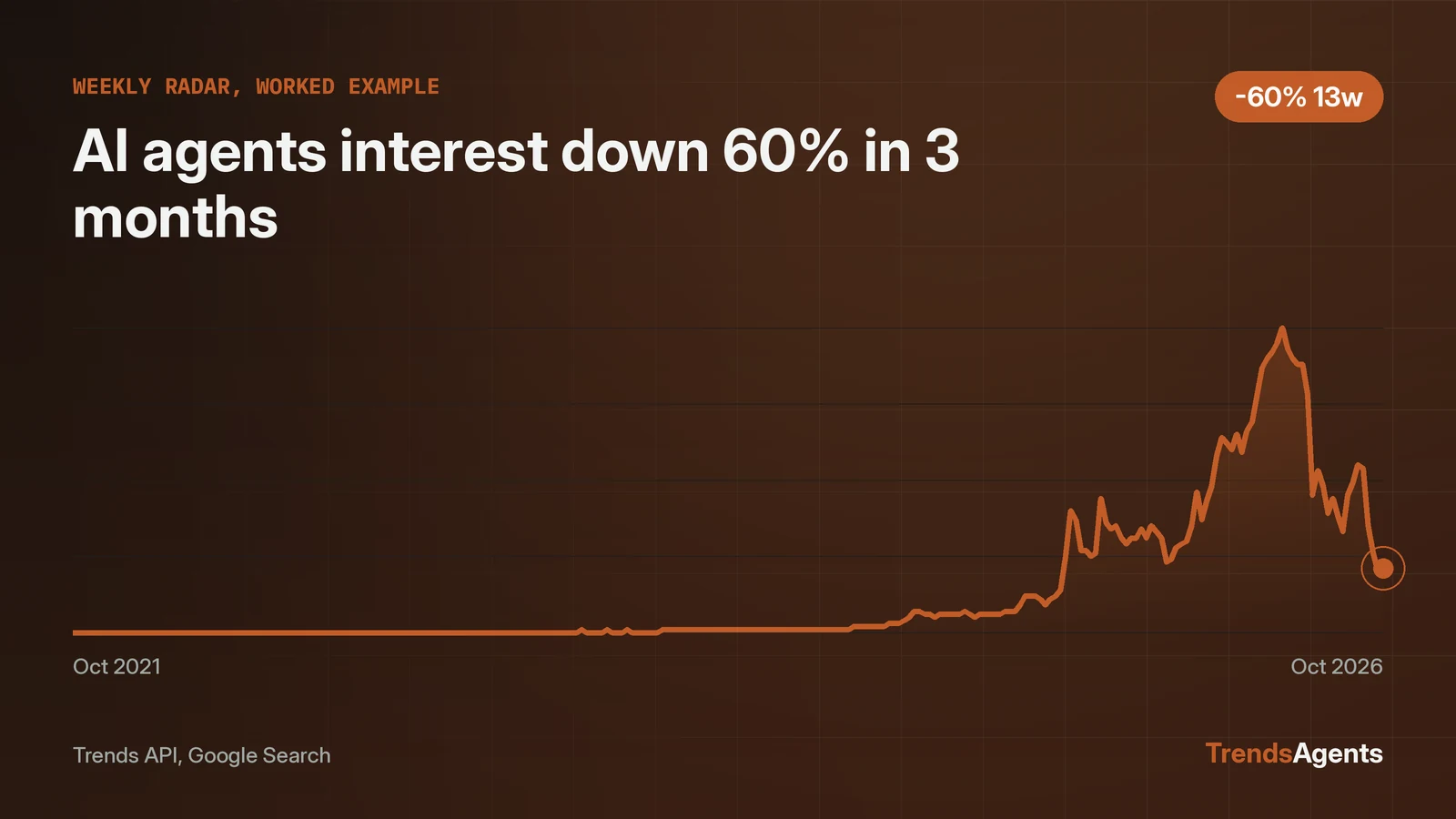
A weekly trend radar agent is a scheduled AI routine that runs every Monday and answers one question: what moved since last week? The agent pulls the current trending boards, measures a watchlist of topics against growth data, compares both to the previous week, and writes a one-page briefing. Point Claude, Cursor or ChatGPT at the Trends API with the loop below and it repeats with no new instructions. On 2026-11-03 the raw pull put halloween at the top of TikTok's trending hashtags, three days after Halloween, a textbook seasonal spike. The watchlist check showed AI agents search interest at 21.0, down 60.38% from 53.0 three months earlier and 32.26% from 31.0 a year earlier. The loop turns those two pulls into a briefing: halloween is seasonal noise, AI agents is a genuine decline worth a closer look. Everything below, schedule, calls, comparison rules, briefing format, is ready to copy.
The loop runs on a calendar, not on a whim
The radar is a schedule with four steps: pull, measure, compare, brief. It runs every Monday at 07:00 local time and finishes with two artifacts: a five-bullet briefing and a log entry that becomes next week's baseline. The agent receives the same instructions every week. Nothing is improvised, which is what makes week twelve comparable to week one.
The loop needs two data calls and one storage file. The calls are exact and verified below. The storage is a JSON log the agent appends to each run. Setup takes one session; after that the agent needs no attention unless an alert rule fires.
Step one pulls the week's raw boards
The agent starts each week with the same raw call: the top trending TikTok hashtags.
python tools/trends.py top --type "TikTok Trending Hashtags" --limit 25
On 2026-11-03 the top 10 came back as halloween, usa, nfl, meme, football, music, citytastetest, dance, animation, targetaudience. Halloween at rank 1, three days after October 31, is the kind of spike the loop is built to discount: the data shows the ranking, and the calendar date suggests seasonality. The TikTok agent page documents the hashtag source in full, including the fields each entry carries.
The agent saves the full 25-item list with the run date. It does not summarize yet. Raw first, interpretation later, so a bad read in one week cannot corrupt the log.
Step two measures the watchlist against growth numbers
Raw boards show what is loud; growth numbers show what is moving. The agent runs one growth call per watchlist topic, on fixed windows, every week:
python tools/trends.py growth --keyword "AI agents" --source "Google Search" --windows 3M 12M
For AI agents on 2026-11-03 the call returned 21.0 on 2026-10-24 against 53.0 on 2026-07-25, a 60.38% decline over three months, and 21.0 against 31.0 on 2025-10-25, a 32.26% decline over twelve months. The time series behind the call holds 261 weekly points back to October 2021, so the decline reads against five years of context, not a single snapshot. The Google Trends agent page covers the growth call's parameters.
Two windows agreeing in the same direction is a stronger read than either window alone. One honest limit: point-to-point growth compares two single weeks, so an odd week at either end can skew the number. When the 3M and 12M windows disagree, the loop says so instead of picking a winner.
Step three keeps a memory so weeks can be compared
A radar with no memory is a weather report. The agent appends each run to a JSON log with the date, the 25 hashtags, and every watchlist topic with its two growth numbers. Next week's compare step reads last week's entry and applies fixed alert rules.
The alert rules are choices, stated up front so they can be tuned: a hashtag entering the top 10 that was absent last week, a hashtag moving five or more ranks, or a watchlist topic moving more than 20% on the 3M window. When nothing trips a rule, the briefing says the week was quiet. A quiet briefing is a feature. It proves the agent ran and found nothing, which is different from the agent never running.
Step four writes the Monday briefing
The briefing is five bullets: two movers from the raw boards, two watchlist reads, one suggested action. Each bullet names its number and its source. With this week's real data, the briefing reads:
- Halloween topped TikTok's trending hashtags on 2026-11-03, three days after the holiday. Seasonal spike, no action.
- USA, NFL and football all sit in the top 10 alongside it, a normal early-November sports cluster.
- AI agents search interest fell 60.38% in three months to 21.0, with the 12M window down 32.26% as well. Genuine decline, not a blip.
- Suggested action: check the AI agents topic page for content planned around the term before committing new work to it.
The loop, ready to copy
The complete spec. Paste it into Claude, Cursor or ChatGPT as the agent's standing instructions, connect the Trends API, and set the schedule.
WEEKLY TREND RADAR, standing instructions

Schedule: every Monday, 07:00 local time.

Step 1, pull:
  Run: python tools/trends.py top --type "TikTok Trending Hashtags" --limit 25
  Save the full list with today's date. Do not summarize yet.

Step 2, measure:
  For each watchlist topic, run:
  python tools/trends.py growth --keyword "<topic>" --source "Google Search" --windows 3M 12M
  Record the recent value, both baselines, and both growth figures.

Step 3, compare:
  Read last week's log entry. Flag: hashtags new to the top 10,
  hashtags moving 5+ ranks, watchlist topics moving more than 20% on 3M.
  If the 3M and 12M windows disagree on a topic, say so.

Step 4, brief:
  Write five bullets: two board movers, two watchlist reads, one action.
  Name the number and the source in every bullet.
  Append this week's data to the log.

Watchlist starter: AI agents, plus three topics from your own niche.
Browse the full set of [research agents](/agents) for more data sources to add.